Key Takeaways
- An Android SMS gateway is a phone with a SIM plus gateway software that exposes a REST API; setup is mostly install, pair, authenticate, and point your backend at it.
- You bring two things: a working Android phone with a SIM, and SMS credit from your own mobile operator. Service pricing is device count + SMS volume. Free and Developer pause when their SMS allowance is exhausted; Starter, Professional, and Business uncap platform send volume and still meter devices.
- A single phone sends on the order of a few hundred to a couple of thousand messages per hour, gated by the carrier. Plan device count around throughput, not just volume.
- The failure modes are predictable: dead battery, lost network, revoked SIM, silent app kill. Monitor delivery reports and heartbeat, and add a second device before you depend on it.
- Use it for control, cost, and regional reach. Reach for a cloud aggregator when you need instant global coverage or very high burst throughput with no hardware.
Most guides answer what an Android SMS gateway is and stop there. If you have already decided you want one, that is not the question you are asking. You want to know how to actually stand one up, what it will cost once real traffic flows through it, how far a single phone will carry you, and where it quietly breaks. This guide is the practical companion to our overview of what an Android SMS gateway is — start there for the concepts, then come back here to build.
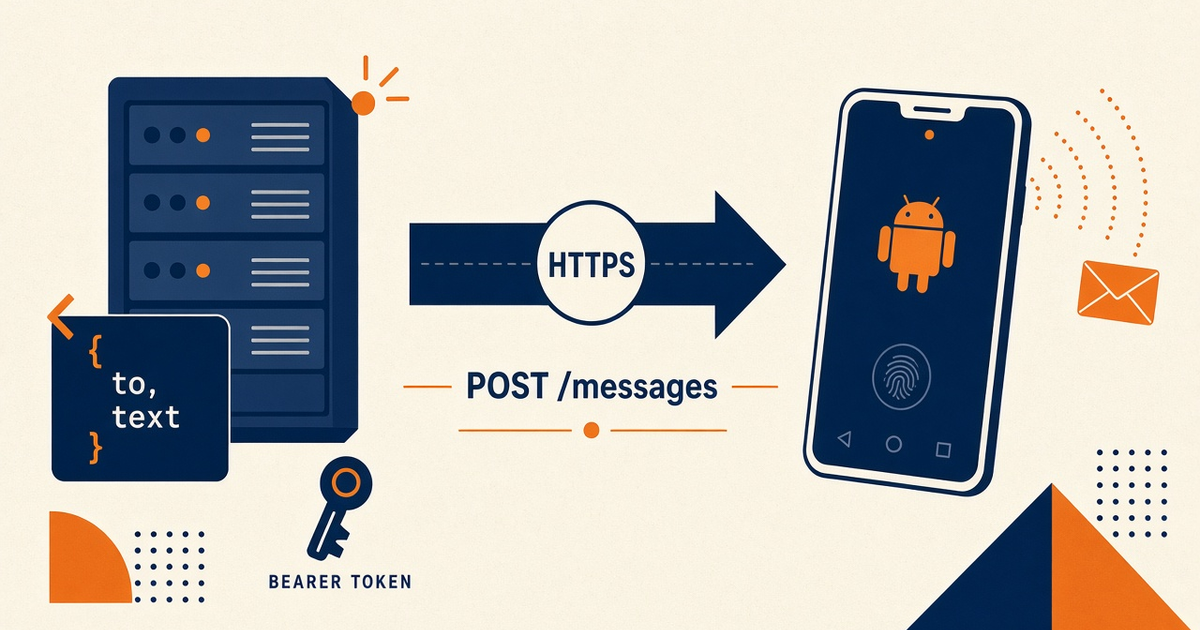
The short version: an Android SMS gateway is an ordinary phone with a SIM, running gateway software that exposes a REST API. Your application makes an HTTP request, the phone sends the text over the mobile network on your carrier plan, and delivery status flows back to you. There is no aggregator in the middle for sending. That single design choice is the source of every advantage and every limitation you are about to read.
Setup is a phone that stays awake, a SIM that can spend, and an API key that never leaves your server. Everything else is optional until the first canary fails at 2 a.m.
What "setup" actually involves
When people say "set up an SMS gateway" they usually picture a hard, server-heavy project. With the Android approach it is closer to configuring a phone than deploying infrastructure. There are four moving parts, and only one of them lives on your side:
- The device: a phone with a SIM, kept powered and online.
- The gateway app: installed on that phone, it turns SMS into an API.
- The dashboard and account: where you register devices, keys, and see message history.
- Your backend: the code that calls the API and receives webhooks.
The first three take about fifteen minutes. The real engineering — retries, monitoring, idempotency, handling replies — is on your backend, and it is the same work you would do against any messaging API. That is worth saying plainly, because it reframes the decision: you are not signing up for a big infrastructure build, you are wiring a new endpoint into software you already run.
Before you start: the checklist
Getting the hardware right upfront saves you from chasing phantom delivery bugs later. Here is what a dependable setup needs.
The phone
- A modern Android phone. It does not need to be new or expensive; a mid-range handset from the last few years is fine.
- Keep it on a charger. A device that sleeps to save battery is a device that stops sending.
- Prefer a dedicated phone over your personal one. Background-app limits and aggressive battery optimisation on a daily driver will interrupt an active gateway.
The SIM and operator plan
- A SIM that can send SMS. That is the whole requirement — no special line, no business contract needed to start.
- An operator plan with enough SMS allowance or airtime for your volume. You pay your carrier for the messages themselves.
- Check whether your plan meters SMS separately. A "1,000 texts a month" bundle behaves very differently from pay-per-text when you scale.
Connectivity
- Stable Wi-Fi is ideal, because the API traffic between your server and the phone rides the internet, while the SMS itself rides the mobile network.
- Mobile data works too, but a phone on Wi-Fi and mains power is the boring, reliable setup you want.
Rule of thumb: if you would not trust the phone to stay awake and online overnight without touching it, it is not ready to be a gateway yet. Fix that first.
Install, pair, and send your first message
This is the fifteen-minute part. The goal is a single message travelling all the way from an API call to a real handset, with the delivery report coming back. Once that round-trip works, everything else is refinement.
- Prepare the device. Put the SIM in, charge the phone, and join it to Wi-Fi.
- Install the app. Get the gateway app from the downloads page and grant it SMS and background permissions. Those permissions are what let it send on your behalf and keep running.
- Create an account and register the device. Sign in to the dashboard and pair the phone. It should appear as connected within a few seconds.
- Send a test message. Using the REST API, post a recipient number and a short body. Send it to a phone you can physically check.
- Confirm delivery. Watch the message arrive, then read the delivery status through the API or your webhook. If both the text and the status land, your path is proven.
Do not skip the delivery-report step. A message that "sent" but never reports delivered is the single most common early surprise, and it is almost always a carrier or permission issue rather than a bug in your code. Our delivery reports guide breaks down what each status means and how to act on it.
Wiring it into your backend
Moving from a manual test to production is where the durable design decisions live. Three pieces matter most.
Sending: keep the key on the server
Your application sends by calling the gateway's REST endpoint with the recipient and message. The API key that authorises that call belongs on your server, never in a mobile app, browser bundle, or public repository. Treat it like any other secret: environment variable, secret manager, least privilege. The full request and response shapes live in the SMS API documentation. Conceptually, a send is a single authenticated HTTP call:
POST /api/send
Authorization: Bearer <YOUR_SERVER_SIDE_API_KEY>
Content-Type: application/json

{
  "to": "+15551234567",
  "message": "Your code is 481920",
  "idempotencyKey": "otp-9f2a-2026-08-01"
}
The response hands back a message id you store and later match against the delivery report. Notice the idempotencyKey: if your first request times out and you retry, that key tells the gateway "this is the same message," so a shaky network never sends the same one-time code twice. Small detail, large difference in production.
Receiving: webhooks for replies and status
Two things flow back to you. Delivery reports tell you whether a message reached the handset, and inbound messages let you build two-way conversations. Both arrive as webhook calls to an endpoint you host. Verify the signature on every webhook so nobody can forge status updates or fake inbound traffic. Our webhook guide covers the payloads and verification.
Reliability: retries and idempotency
Networks blink. Design the send path so a transient failure is retried with backoff rather than dropped, and so a retry never sends the same OTP twice. The standard pattern is an idempotency key per logical message: if you replay a request after a timeout, the gateway recognises it as the same message instead of a new one. Store the outbound status in your own database too, so your system of record does not depend on polling the gateway.
Dual SIM and one-phone capacity
Before you buy a second phone, it is worth squeezing everything you can from the first one. A lot of modern Android handsets carry two SIMs, and a dual-SIM device effectively gives you two sending identities in one piece of hardware. That matters for two reasons.
- Load spreading: splitting traffic across two SIMs on the same phone keeps each number's hourly rate lower, which is exactly what carriers want to see. Two SIMs each sending at a calm pace look far healthier than one SIM sprinting.
- Coverage and cost: two operators on one device let you route a message down whichever network delivers best or cheapest for a given destination — useful the moment you send across regions.
Dual SIM is not a substitute for real redundancy, though. Both SIMs still live in one phone, sharing one battery, one OS, and one Wi-Fi link. If that phone dies, both numbers go dark together. Think of dual SIM as a way to get more throughput and routing flexibility from a single device, and of a second physical phone as the thing that actually removes the single point of failure. The plan tiers account for both: device count is what you pay for, and every device can run its dual SIM.
What it really costs
This is where the Android approach diverges sharply from cloud aggregators, and where teams either save a lot or get surprised. There are two separate bills, and keeping them separate is the key to understanding the model.
The two bills
| Bill | Who invoices you | What it meters |
|---|---|---|
| Gateway service | SMS Gateway | Connected devices + platform SMS volume (Free 300 lifetime; Developer 25,000/year; Starter/Pro/Business uncap platform volume, devices 2/5/15) |
| Operator airtime | Your mobile operator | SMS the SIM actually sends, including retries. We do not resell this. |
| Ops | You | Chargers, spares, someone’s time when a phone sleeps |
Paid plans begin at $19 per month. Free and Developer pause when their SMS allowance is exhausted — upgrade or custom, not silent $0.0x overage. Starter, Professional, and Business uncap platform send volume; operator fair-use and device caps still apply. See the pricing page for the full tiers.
A worked example
Say you send 10,000 SMS a month from one SIM. On a cloud aggregator charging around a cent per message, that traffic alone is roughly $80–$85, before number rental and carrier pass-through fees, and it scales linearly: double the volume, double the bill. With the device-and-volume model, 10,000 messages needs a plan whose SMS allowance covers that volume (or a custom arrangement)—plus your operator airtime, often lower if the texts sit inside a bundle you already pay for. Exceed the platform allowance and sending pauses until you change tier; it is not free infinite platform traffic because you paid one flat fee.
The trade is real and worth stating honestly. The aggregator gives you instant global reach and huge burst capacity with no hardware; you pay per message for that convenience. The Android gateway gives you a predictable plan fee tied to devices and volume, plus your own SIM channel; you supply the phone and the operator credit, and you own the radio throughput ceiling. For a side-by-side on cost and control, see Twilio vs an Android SMS gateway.
Throughput and scaling
The most important number in this whole guide is one nobody advertises loudly: how fast a single phone can send. A normal consumer SIM realistically pushes a few hundred to a couple of thousand messages per hour, and the ceiling is set by the carrier, not the app. Operators watch for handsets that suddenly fire like a bulk sender and will throttle or suspend them.
That reframes scaling. You do not scale an Android gateway by making one phone faster; you scale it by adding phones and SIMs and spreading load across them.
- One device covers OTP for a small app, transactional alerts for a growing shop, or internal notifications.
- A handful of devices with routing across them covers steady campaign and alert volume, and gives you failover as a bonus.
- A fleet spreads high volume and multi-country sending across many SIMs, using local SIMs where that improves deliverability and cost.
Plan device count against your peak hourly rate, not your monthly total. Ten thousand messages a month is trivial; ten thousand messages in one hour is a fleet problem. If your traffic is bursty — think a flash alert to every user at once — size for the burst. Multi-device routing and failover are why the higher plans exist; the same pricing tiers map device count to capacity.
A quick capacity example
Suppose you run appointment reminders for a clinic network and need to push 3,000 messages every morning between 8am and 9am. That is 3,000 in a single hour, which is right at the edge of what one well-behaved SIM should attempt. The safe design is not one phone racing the clock; it is two or three devices sharing the batch so each SIM sends at a relaxed thousand-ish per hour, well inside carrier tolerance, with headroom if one device drops. Now suppose the same network sends 50,000 promotional messages spread across a whole day. The hourly rate is gentle, so a couple of devices comfortably absorb it — the constraint was never the daily total, only how tightly it bunches. Work backwards from your worst hour and the right device count falls out on its own.
Designing for failure
A self-hosted gateway fails in physical, unglamorous ways, and the good news is that they are all predictable. Design for them once and you rarely think about them again.
- Dead or throttled battery: a phone off its charger stops sending. Keep it powered and disable aggressive battery optimisation for the app.
- Lost network: Wi-Fi drops or mobile data lapses. Alert on a stalled device heartbeat so you learn before your users do.
- SIM or account block: a carrier flags the number for spam-like bursts. Stay within sane send rates and honour opt-outs.
- Silent app kill: the OS reclaims a background app. Grant the permissions that keep it alive and watch that it stays connected.
- Single point of failure: one phone is one point of failure. Run at least two before anything important depends on it.
The detection layer is not optional. Monitor delivery reports for a rising failure rate, watch each device's connection status, and alert when the heartbeat goes quiet or a message queue backs up. A gateway you cannot see is a gateway you cannot trust. Pair that with retries and a fallback route for critical messages such as OTP, and a single dead phone becomes a non-event instead of an outage.
Security hardening
Because you own the channel, you also own its security. The checklist is short and non-negotiable.
- Transport: call the API over HTTPS only.
- Authentication: use API keys, and add IP allowlisting where you can pin the source.
- Secrets: keep keys server-side, out of client code and version control, rotated on a schedule.
- Input validation: sanitise recipient numbers and message bodies to avoid injection and malformed sends.
- Webhook verification: validate the signature on every inbound webhook so status and reply traffic cannot be spoofed.
- Physical access: the phone is real hardware. Put it somewhere access-controlled and lock the screen.
None of this is exotic — it is the same hygiene you apply to any API integration — but the physical device adds one extra dimension most cloud APIs do not: someone could literally pick the phone up. Treat it accordingly.
Compliance and carrier limits
Owning the channel does not exempt you from the rules that govern messaging. Consent still matters: send to people who agreed to hear from you, and make opt-out easy and instant. Regional regulations still apply, from content rules to sender registration in some markets. And carrier acceptable-use policies apply to your SIM exactly as they do to any phone — bursting like a spammer is the fastest way to get a number blocked.
The practical upside is that a SIM-based channel often maps cleanly onto local rules, because you are sending as a normal subscriber on a local network rather than routing foreign traffic through an aggregator. That can help deliverability in regions where international routes are filtered. It does not remove your responsibility to follow the mobile messaging standards and local law — industry bodies such as the GSMA publish the messaging guidelines worth knowing before you scale into new markets.
Common setup mistakes
Almost every rocky launch traces back to a handful of avoidable mistakes. If you only remember one section for troubleshooting, make it this one.
- Using a personal phone as the gateway. Your daily driver gets notifications silenced, apps killed, and battery saver switched on — all of which stall sending. Dedicate a device.
- Leaving battery optimisation on. Android will happily suspend a background app to save power. Exempt the gateway app explicitly, or it will look "connected" and quietly stop working.
- Bursting on a fresh SIM. Firing thousands of messages in the first hour on a brand-new number is the fastest route to a carrier block. Ramp up; behave like a person, then a business, not a spammer.
- Skipping delivery reports. Treating "the API returned 200" as "the message arrived" hides real failures. The report is the truth; wire it in from day one.
- No monitoring and no second device. A single unwatched phone will fail silently at the worst possible time. Add a heartbeat alert and a spare before anything important depends on it.
- Putting the API key in the app or the frontend. Anything shipped to a client can be extracted. Keys stay on the server, full stop.
None of these are exotic edge cases — they are the same five or six issues nearly everyone hits once. Design around them up front and your gateway simply runs.
When it is the wrong tool
A guide that only sells the upside is not much of a guide. There are cases where an Android SMS gateway is the wrong answer, and recognising them early saves everyone time.
- Instant global coverage from day one: if you need to reach dozens of countries tomorrow with no hardware, a cloud aggregator's network is built for exactly that.
- Very high sustained burst throughput: if you must send hundreds of thousands of messages in minutes, the per-phone ceiling makes a device fleet impractical.
- Zero operational appetite: if nobody can own a phone, a charger, and a monitoring alert, a fully managed API removes that burden — at a per-message price.
Plenty of teams run a hybrid: Android gateways for the countries and volumes where owning the channel wins on cost and control, and a cloud route for the long tail of global reach. The two are not mutually exclusive, and picking one forever is rarely necessary.
Next steps
If the model fits, the fastest way to know for sure is to try it. Install the app on a spare phone, pair one device, and push a single message through the API using the free tier. You will learn more from that fifteen-minute round-trip — including whether your carrier and permissions behave — than from any amount of reading.
From there, the path is incremental: wire the API into your backend, add webhook handling for replies and delivery reports, put monitoring on the device, and add a second phone before you depend on it. When you outgrow one SIM, move up a plan and let multi-device routing spread the load. Start with the app download, keep the SMS API documentation open for the API details, and check the pricing tiers when you know your device count and volume.
Related product pages
Jump to the live product docs for this topic—not another long-form article.
- device and SMS volume pricingPlans and allowances
- device setup guidePair and go live
- download the Android gateway appGet the APK
- Android SMS gateway product guideDefinition, product, and how to buy