Key Takeaways
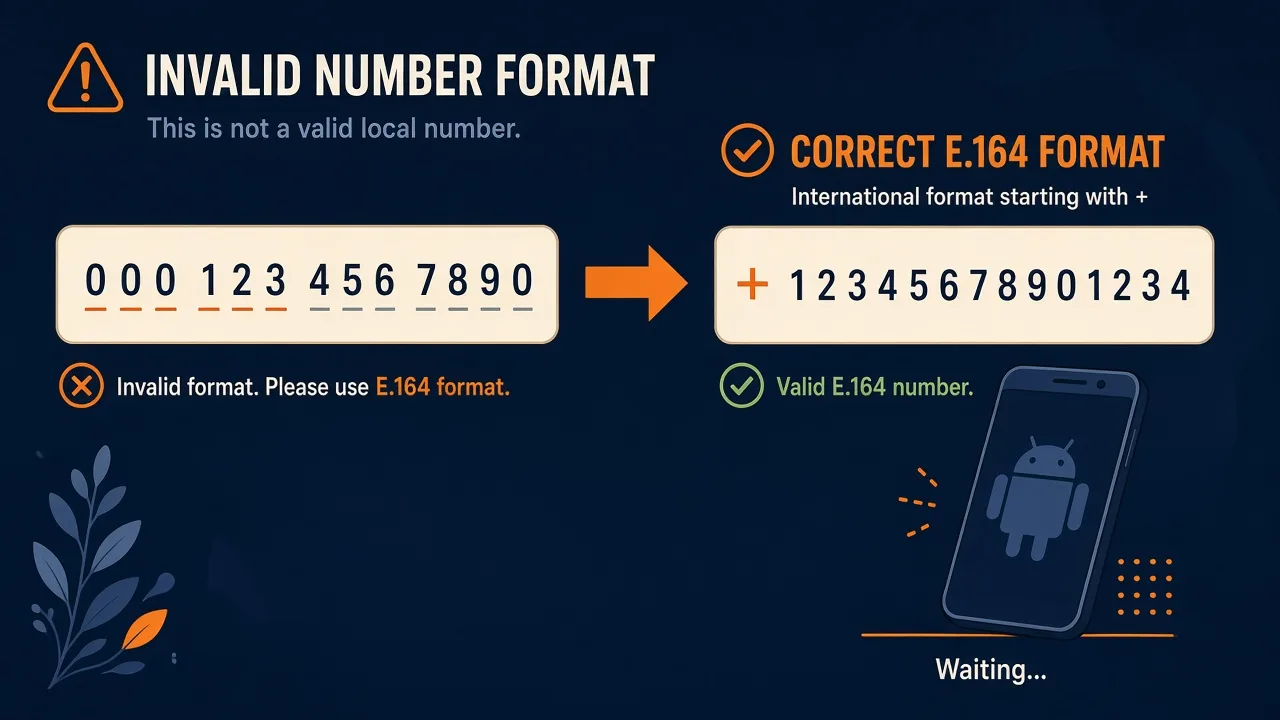
- Invalid number format on an Android SMS gateway is almost always a to[] value that is not E.164 — missing +, leftover 0, spaces, or a national number from a CSV.
- Fix in your backend with a real parser. Do not spray retries at 4xx.
- Live error envelopes are in the OpenAPI. This page is the playbook, not a field catalog.
- A well-formed number can still fail on the radio. That is DLR, not format.
- Service pricing is based on device count and total SMS sent through the gateway. You need a working Android phone with a SIM and SMS credit from your mobile operator. Operator message costs are yours—we do not sell carrier SMS balance.
Android SMS gateway troubleshooting for invalid number format is a client hygiene problem:to[] must be E.164. Spaces, dashes, 00 prefixes, and Excel-stripped plus signs show up as invalid_request — or worse, as a send to the wrong country if you only strip formatting.
Service pricing is based on device count and total SMS sent through the gateway. Shape: API docs. ITU vocabulary: ITU-T E.164.
If Excel ate the plus, you do not have a gateway bug. You have a spreadsheet.
What E.164 wants
Plus, country code, subscriber number. No spaces. Docs sample uses US +14155552671. Send:
curl -X POST "https://app.sms-gateway.app/api/v1/messages" \
  -H "Authorization: Bearer $SMS_GATEWAY_API_KEY" \
  -H "Content-Type: application/json" \
  -H "Idempotency-Key: 3f1b0c8a-9d2e-4c77-9f5a-2b6d1e0f4a83" \
  -d '{"to":["+14155552671"],"text":"Your verification code is 481920","type":"sms"}'
Symptom table
| You sent | Likely issue | Fix |
|---|---|---|
| 01712xxxxxxx | National 0, no country | +880… (BD) after you know the country |
| 0014155552671 | International 00 | Replace 00 with + |
| (415) 555-2671 | Punctuation / missing CC | Parse, then E.164 |
| 14155552671 | Missing + | Add + if the region is known |
| Valid E.164, DLR failed | Radio / operator | DLR, not a format retry loop |
Local formats that look fine
India 10-digit, Nigeria leading 0, US 10-digit without +1 — all look “complete” in a CRM. Store country with the contact. CSV import: Excel/CSV bulk.
Normalize once, in your backend
Use a maintained parser in your language. Do not regex in the browser and hope. Do not invent API fields for “format=local.” You need a working Android phone with a SIM and SMS credit from your mobile operator. Operator message costs are yours—we do not sell carrier SMS balance.
Do not retry a bad number
4xx validation is not a timeout. Retry backoff. Isolate OTP so a bad marketing CSV cannot occupy the login SIM.
Checklist
- Contacts stored E.164.
- CSV plus signs preserved (text column).
- Country known before stripping 0.
- 4xx not retried.
- Canary on a staff E.164 you control.
Next steps
Pair via downloads, send one known-good +number, then dump your CRM’s worst row through the same normalizer.
Related product pages
Jump to the live product docs for this topic—not another long-form article.
- SMS API documentationLive endpoint reference
- device and SMS volume pricingPlans and allowances
- Android SMS gateway product guideDefinition, product, and how to buy
- download the Android gateway appGet the APK